Script – Fab.com Material Importer
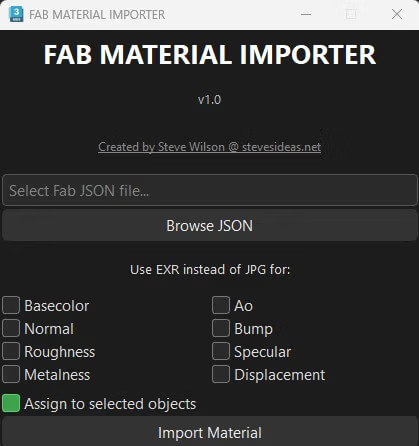
I created a Fab.com material importer for 3dsmax and Vray. I have only tested 3dsmax 2025 & Quixel materials and files so far so not sure if this script would work for every material that can be downloaded from Fab. I do not know for sure if there is anything else out there like this but I’m hoping this script can help people reduce their import and setup time when using assets from Fab, now that Quixel Bridge is deprecated.
Please download the script from here: Download
1. You will need to install the latest version of Python (make sure you select the two checkboxes when installing so that Python installs with Admin rights and the paths are created correctly)
2. Once you have installed Python you will need to install pyside 6. You can do this by opening a command console with admin rights and typing in:
pip install PySide6
Once Pyside6 is installed open 3dsmax and run the Fab Material Importer script you downloaded. This will allow you to select the Json file that is downloaded when you download a zip material file from Fab.com
With the plugin you can choose if you prefer to load EXRs or JPGs for your textures and also if the loaded material is applied to the selected object.
Let me know how you get on. I hope this scripts helps some people. Thanks. Steve